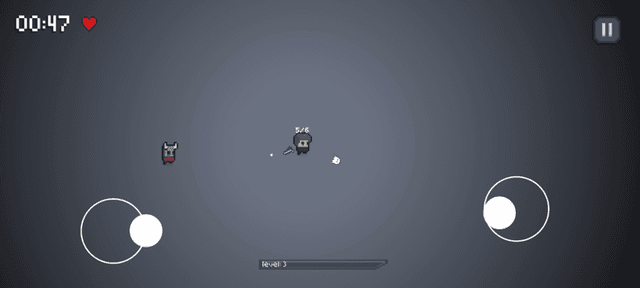
Overview
3 Lives is a landscape-oriented mobile wave-survival game developed in Unity where players defend against escalating hordes of undead adversaries with a strict three-life limit. The game pairs a dual-touch control scheme with a progressive leveling curve that scales enemy speed, health, and spawn density over time.
Tools & Technologies: Unity, C#, LeanTween, Android Build Pipeline
Technical Contributions & Systems Breakdown
1. Memory & CPU Optimization Pipeline
To sustain a consistent frame rate across diverse Android hardware, I architected the runtime loop to minimize garbage collection overhead and CPU bottlenecks:
- Object Pooling System: Engineered reusable object pools in C# for all projectile instances and zombie entities, eliminating runtime
InstantiateandDestroycalls and preventing garbage collection frame stutters during high-density waves. - Component Reference Caching: Refactored entity scripts to cache component references during initialization, removing repetitive
GetComponentlookups from per-frameUpdateloops. - Physics Matrix & Tag Optimization: Configured dedicated Unity physics layer collision matrices and replaced string comparisons with
CompareTagto reduce physics evaluation overhead. - Asset & Audio Compression: Standardized texture atlas packing and compressed audio streams to shrink the APK footprint and reduce RAM usage on mobile devices.
- Adaptive Frame Rate Throttling: Implemented dynamic target FPS controls to balance battery consumption and thermal performance against high-refresh gameplay.
2. Core Gameplay & Progression Mechanics


- Dynamic Wave Spawner: Built a wave controller that progressively introduces faster and higher-health enemy variants based on survival duration.
- Player Leveling System: Implemented an experience and upgrade loop that scales player damage throughput to match escalating wave difficulty.
- Dual-Touch Input Controller: Created a responsive two-touch input handler (one touch for movement, one for aiming and firing) tailored for handheld ergonomics.
3. Programmatic Mobile UI Architecture
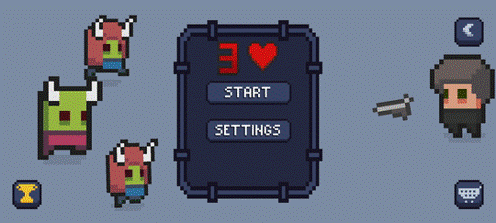 Showcase of the lightweight, animated main menu transitions.
- Handheld Ergonomics: Designed high-contrast HUD layouts with large tap targets suited for small phone and tablet viewports.
- LeanTween UI Motion: Integrated the LeanTween library to drive vector translations, scaling, and fade transitions in code, avoiding the performance overhead of Unity Animator controllers.
Direct Impact
- Stable Mobile Performance: The object pooling and component caching architecture eliminated frame drops during peak horde counts on mid-range Android devices.
- Lightweight Footprint: Texture atlasing and programmatic UI tweening kept memory consumption low and load times fast.